

Admin Panel: Simplify Daily Operations With AI Taxi App
Everything needed to run a taxi business comes together in one simple Admin Panel. A taxi business can now be managed without dealing with complicated systems. The Panel is built to keep everything simple and easy to manage. From drivers, users, rides, and earnings to AI handling surge pricing, fraud detection, driver Payouts, smart routing, system monitoring, and promo codes, the entire business runs smoother, faster, and more efficiently every day.

Smart AI Features in Your Taxi App Admin Panel
Manage and grow the taxi business with powerful AI tools built into the admin panel. Each feature is designed to reduce manual work, improve accuracy, and drive better business results.
Payday can be stressful as your fleet or number of taxi drivers grows. The AI-driven panel simplifies the entire process by calculating commissions and generating reports automatically. It ensures every driver is paid accurately and on time, without you needing to double-check the math. It’s built for scale, keeping operations smooth and error-free.

The platform integrates AI-driven fraud detection to secure business operations at every level. It continuously monitors transactions and user behaviour, identifying anomalies and flagging potential risks instantly. This allows quick action against fraudulent activities, minimizes revenue loss, and ensures a safe, reliable environment for both riders and drivers.

AI-powered surge pricing helps businesses increase revenue without manual effort. It studies demand, peak hours, and external factors to adjust fares automatically. This ensures better driver availability, balanced supply and demand, and higher earnings, while the system manages pricing changes efficiently in the background.

The system uses AI to send smart promo codes based on user behaviour. It targets the right customers with the right offers, improving bookings and retention. This helps businesses avoid unnecessary discounts, control marketing costs, and achieve better results from promotional campaigns with minimal effort.

The platform stays stable with AI-based system monitoring working 24/7. It tracks ride flow, app performance, and payments in real time. Any issue is detected early and can be resolved quickly, helping businesses avoid disruptions, reduce cancellations, and deliver a smooth and reliable user experience.
Let users book rides the way they talk. With AI-powered voice and text support, a simple message or command turns into a confirmed trip. It quickly understands user intent and location, making the booking process smooth, fast, and accessible for everyone.
Make ride booking as easy as chatting on WhatsApp. Users can book, view fares, and confirm rides instantly without downloading anything. This experience increases trust and drives more bookings, helping your taxi business grow faster with minimal effort.
Admin Access
The Admin Login panel allows authorized administrators to securely access and manage users, drivers, trips, dispatch operations, billing, and overall system activities from one centralized dashboard.

Easy & Attractive Interface
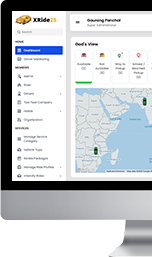
View summary of entire system like number of User, Drivers registered, Total Earnings, Total Trips taken, On Going Trips, Latest Trips, Notifications etc..
Server Monitoring
Admin can view the server load in terms of CPU/RAM and Disk space usage. Admin can also diagnose any error in system from this section.

Admin Users Management
Super Admin can manage Admin Users from here. Admin can add/modify/delete Admin and their rights.

Fleet Company Management
Admin can manage the Fleet Companies registered on the System. They can review the documents and drivers registered under any Fleet Company. Admin can add/modify/delete any Fleet Company.

Hotels Management
The powerful Uber clone admin panel allows you to Manage all the registered Hotels at the touch of a button. Using the Panel, you can Activate/Deactivate the Hotel Admins, Add/Delete Hotel Admin Profiles, Sort & Filter them, and more.

From a single dashboard, you, as the app administrator can manage all the taxi services in one go. You can quickly enable and disable the services with easy-to-use toggle controls.

Drivers Management
Admin can manage the Drivers registered on the System. Admin can review the Documents and Vehicles added by them. Admin can approve/reject any Driver's account. Driver would be able to get online only if their account is been approved by the Admin. Admin can add/modify/delete any Drivers.

Admin can define the time duration for reward campaign and also set the criteria to achieve the Level and Rewards for Taxi Drivers.

Users Management
Admin can manage the Users registered on the System. Admin can add/modify/delete any User.

Taxis/Vehicles Management
Admin can manage the Taxis/Vehicles added by the Drivers. Admin can review the Vehicle document and can approve/reject the Vehicle. Admin can add/modify/delete any Taxi/Vehicle.

Manage Rental Package
Use this section to manage the price for the different vehicles. You can also change/ modify or even add different vehicle types from right here and prepare different packages like Basic, Luxurious, Moto or Normal.

Vehicle Type Management
Admin can manage the Vehicle Type/ Categories shown on User App. They can define the Vehicle Type name, Rates and other details.

Rates will be defined based of Vehicle Type/Categories. Admin would define the Price per Kms, Price Per minute, Minimum Fare, Base Fare, Commission (%), Cancellation Charges and Peak time charges for each Vehicle Type.

Admins do not have to worry about manual fare updates, as AI now watches the demand. It tracks demand patterns like peak hours, late-night travel, weekend rush and weather changes, then adjusts fares automatically. This helps you increase revenue while keeping your drivers active and without constant manual effort.

AI simplifies the entire driver’s Payout process. It calculates commissions, prepares detailed reports, and ensures drivers are paid accurately. No matter how large your network grows, payments stay quick, error-free, and easy to manage.

The AI system works in the background of your admin panel to monitor every activity. It identifies unusual patterns, fraud, flags potential risks, and helps you act instantly. This keeps your platform secure, protects your reputation, and builds long-term user trust.

Manual Taxi Dispatch
Anyone who does not have the uber clone app on their mobile like the elderly people or those not possessing the knowledge of using technology to request a Taxi via their phone can manually call Your Taxi Company and book the Taxi. They do not have to register or login in anywhere. Admin will manually dispatch Taxi for you by taking the details such as Name, Email address, Pick up location, Drop off location, Time and date etc... Admin can manually choose the Driver or let the system auto assign the Driver. The Taxi will be dispatched on the specified time and the User will get the details of the Driver X minutes prior to the Trip time.

Ride Later Bookings
Admin can view all the Trips booked for a later time. The System will auto assign the Driver for each Trip booked or the admin can manually assign the Trip to any Driver who are available at that time.

Trips Management
Admin can view all the Trips done so far on the System. Admin can filter the Trip by Date, Company, Driver, User and view invoice of any Trip.

Use Promo code to provide discount and offers to your Users and promote your services. Also offer discounts on Festivals and other Events to get more Rides.

God's View
Admin can view all the Taxis on the world map. All the Taxis that are online will show with their busy or empty status using the real time GPS Tracking System. The admin can also keep track of all the Taxis in real time location and click on any Driver to see their basic details.

Heat Map View
Admin can see the location where the maximum number of Users may be looking for a taxi in order to divert them to those locations and take advantage of the requirement.

This section will enable the admin to view all the reviews that have been given over the app for the Drivers by the Users as well as for the Users by the Drivers. The Admin will be able to export this into an excel sheet report.

Use this section to promote, highlight or even showcase the different offers as well as information about your app. You can also put in all the details from here and the information you set on this section will reflect on the opening page of the application.

Decline/ Cancelled Trips Alert for Drivers
This is a section that will help you see how many trips have been declined or cancelled by the driver. You will also be able to see the information of every individual driver. This section will also give you an option of Blocking the Driver or allowing them to continue getting ride requests.

Reports
We have an enhancement report section where in you as an Admin can see various reports like Payment Report, Total Earning Report, Referral Report, User wallet Report, Driver Payment report, Driver Log Report etc.. Using our advanced Payment reports - You can see how much you are earning. Check where you need to put in more efforts - whether to increase/decrease the commission or work on more marketing. Our advanced reports will help you to plan your business well.

This feature will enable you to basically create a geolocation and identify a particular area to mark it separately for Area restriction, Vehicle type restriction, Location Wise Fare or Airport surcharge.

Add Restricted Area
This is basically a feature which would prevent a particular area that is marked by you from being able to send out ride requests. In case, the pick up or drop location happens to fall within the restricted area, the app would not send out ride requests.

Add Location Wise Fare
This is a simple and yet useful feature that allows you to demarcate specific locations to provide a specific fare. For example, rides in the area X will have a particular pricing while rides in Area Y will have a different kind of pricing.

Airport Surcharge
This feature will basically enable you to add an additional surcharge to the rides originating from or terminating at the airport. You mark the Airport area separately and thereby whenever a ride is requested to or from the airport, the price is automatically calculated as per the surcharge pricing.

Admin can manage all the Settings related to entire System from here like General Settings, Email templates, Documents, Language labels, Car Make/Models, Information Pages, Currency Rates Management, SEO Settings, Database backup, FAQs etc..

This is the section that will allow you to set specific units for specific locations. You will be able to “Localize” the features of your app to ensure that every city or country that you offer your services in can be relevant. Here you will see a list of locations and you can add/modify the units of distance, code etc.

Send Push-Notification
This is a feature that will allow you to connect with your entire user base by giving them information regarding various offers or promotions that you have. You can select user type, select Users and put down the message that you want to send out.

Your Users can book rides for personal use as well as corporate use. This section will allow you to see which rides were made under which section. It will also allow you to set details of the organizations and payment methods.

Add Organization
This segment will allow you as an admin to add organizations to the app. This section will show you all the fields such as name of the organization, email address, password etc.