
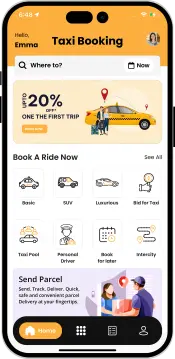


Let your users know the exact fare before they even book a ride. Our AI instantly calculates prices based on traffic, distance, and real-time factors. This transparency helps avoid confusion or disputes after the trip ends. Customers feel more confident, comfortable, and are more likely to trust your platform.
Users can easily spot surge pricing right on the booking screen. Whether it’s late-night travel, bad weather, or peak demand, AI adjusts fares in real time. It clearly shows updated prices to users, helping them make quick decisions while keeping your drivers motivated and available.
Make taxi booking as simple as chatting. With our AI-powered WhatsApp chatbot, users can book rides directly through your website’s WhatsApp widget or number. Just one click starts the conversation, and the chatbot handles the rest, offering a fast, familiar, and highly convenient booking experience.
Main Home Page


Quick Signup
Users can signup or create a new account using their phone number or social accounts.

Easy Login
Users can log into their account using their email/phone number or social accounts like Google.

Login Using Mobile
Users can log into their account using their Mobile.

Choose Verification Method
User can enter the Mobile number and can choose the Verification Method as
- Verify by SMS
- Verify by WhatsApp

Verification Code
User can enter the OTP and Log In.

User Panel
Users can edit their email, phone number, country, etc., from the web panel.

Manage Your Documents
Manage your uploaded documents such as ID verification files, government-issued ID, profile verification records, etc., with ease. Access, review and update your documents via the secure online portal.

Web-based Taxi Booking
Users can book taxis via the website by entering pickup and drop off locations, vehicle type, payment method, etc.

Users can search, sort, and view their previously booked trips on the web panel.

View Invoice Details
Users can view their invoice details such as driver’s name, trip date, pickup/drop-off time, etc..

View Wallet Transaction Details
Users can view all the details of the transactions they made online/offline.

Driver Panel
Taxi drivers can signup or create a new account using their phone number or social accounts.

Taxi drivers can log into their accounts using their email/phone number or social accounts like Google.

Drivers can edit or manage their profile through the web panel.

Manages your documentation that you have uploaded as the driver, such as your pictures, ID cards, and address proof quickly and easily. You can find all documentation you have uploaded at any time, see what is currently approved.

Accessible Side Menu
The driver’s web panel has a sleek menu where they can easily access pages like My Earnings, Wallet, Booked Trips, and so on.

Edit Personal Details
Drivers can edit their personal information, like name, country, and email.

Manage Registered Vehicles
Drivers who have registered multiple vehicles that they’d be using for taxi service can easily edit, delete, or add one right from the panel.

Add Vehicle
Taxi drivers can add more than one vehicle to their profile and manage it right from the web panel.

Drivers can manage the trips and see the booking number and date, user, fare, and other details on a single page.

View Invoice
Drivers can view invoices for the trips they have completed so far in one place.

Access Earning Reports
Drivers can get earning reports, which include details like booking ID, fare, commission, tax, tip, and payment request.

Manage Wallet
Drivers can manage and view their wallets, check the transactions, and keep track of their wallet balance.

Withdraw Wallet Amount
Drivers can send a request to withdraw money from their wallets. They need to enter a few details, like Account Holder Name, Bank Name, Account Number, etc.

Organization Panel
Register an Organization
Fleet companies or organizations can register easily by providing a few details like phone number, name, social accounts, and so on.

Quick Login
Organizations can quickly log into their accounts using their social accounts or credentials.

Organizations can manage their profiles right from the web panel. Alongside, they can view the number of trips they’ve completed, get trip reports, and much more.

Side Menu
The web panel incorporates a side menu that gives one-tap access to different pages like organization user, trip report, and user trips.

Manage Organization Users
The web panel integrates useful features like managing users. The organization can manage the users (drivers), view their phone numbers, edit their profiles, block or delete their profiles, and see the number of completed trips.

Manage Organization Trips
Organization Panel incorporated the functionality of organizing user trips, viewing booking numbers, driver’s details, etc.

Access Trip Reports
Organizations can access trip reports that include detailed information about the fare, invoice, pickup location, driver, and user names.

Contact Us Page
The web panel also includes a Contact Us page wherein you can showcase your contact form, email and phone number, and your business’s address.

-
Administrator Panel Visuals
Manage the Apps and Web Panel's using our user friendly Administrator Panel.
View More
Check out our easy-to-use Uber Clone admin panel. See how effortlessly you can manage your business activities.
-
App Screens & Flow
Have a look at the Step by step flow of how Driver & User Apps work in sync with each other.
View More
-
Live Demo
Download our Live Demo on your mobile phone and try it in real before you place an order with us or any other company. We bet, our Apps are best.
View More


